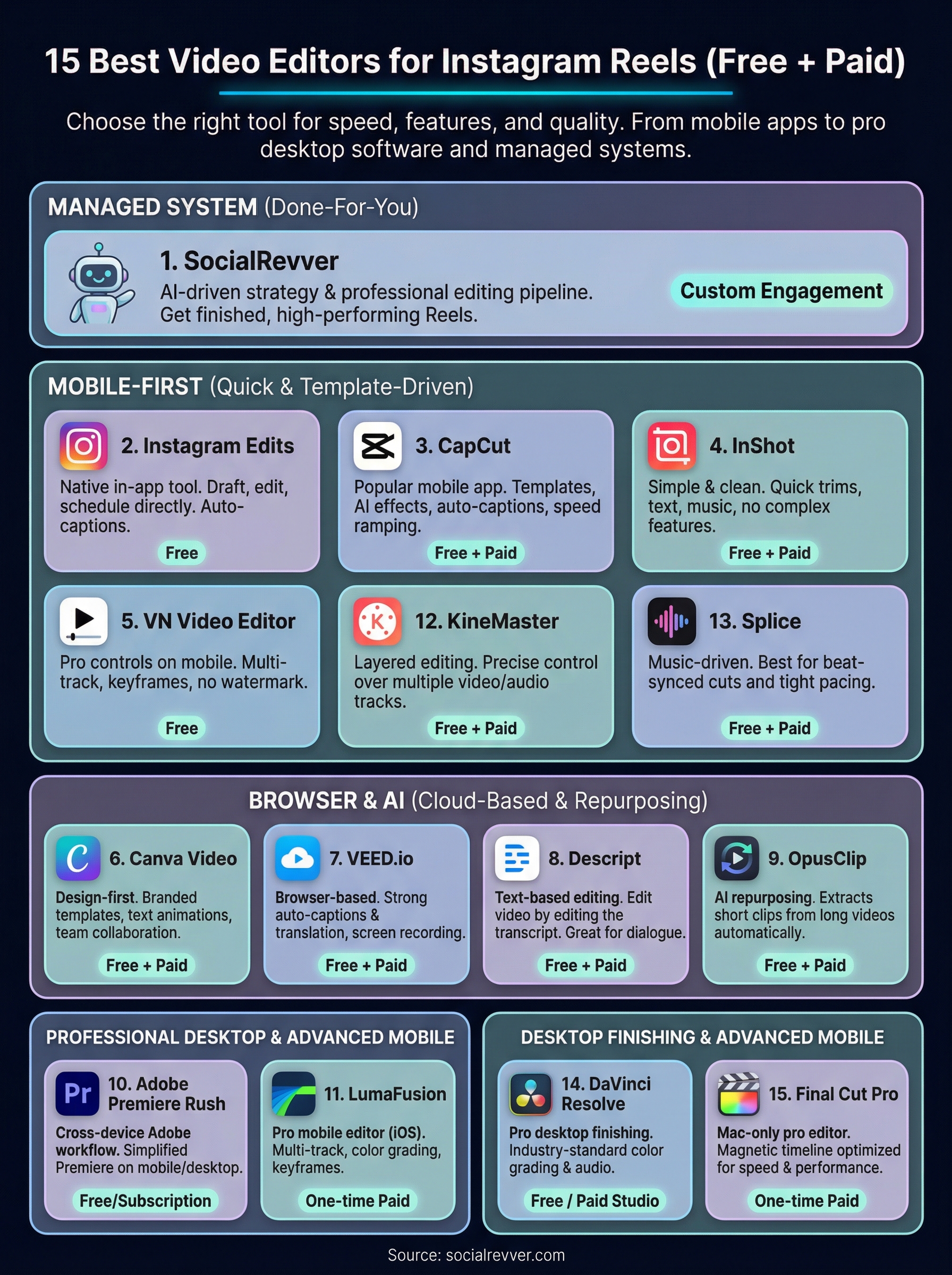
15 Best Video Editors for Instagram Reels (Free + Paid)
Find the best video editor for instagram reels to scale your brand. Compare 15 free and paid tools for AI automation, mobile speed, and professional editing.
#1 Organic Social Growth Agency • Clutch, G2, TrustPilot • 2x Inc. 5000
The right editing tool can be the difference between a Reel that gets skipped and one that stops the scroll. But with dozens of apps available, finding the best video editor for Instagram Reels comes down to what actually matters: speed, useful features, and output quality.
At SocialRevver, our AI-supported editing pipeline processes thousands of short-form videos for founders and business owners building authority through content. We've tested and worked alongside nearly every major editing tool on the market, so we know which ones hold up under real production demands and which ones just look good in an App Store screenshot.
This guide breaks down 15 video editors for Instagram Reels, both free and paid, with a focus on mobile-first apps that offer templates, auto-captions, and intuitive workflows. We evaluated each one so you can pick the right tool for your needs and get back to what actually grows your brand.
1. SocialRevver
SocialRevver is not a standalone editing app you download from a store. It's a managed content production system built for founders, business owners, and creators who want high-performing Instagram Reels without handling the editing themselves. The system combines AI-driven strategy, professional editing, and distribution optimization into one done-for-you pipeline.
Use it if you want a managed reels editing system
If you spend hours editing content and still get inconsistent results, SocialRevver replaces that process entirely. The Attention Engine draws on a database of over 750,000 analyzed videos to identify what works in your niche, then builds and edits content around those patterns. You get finished Reels engineered to perform, not a blank timeline to fill.
SocialRevver fits best for professionals who want to grow on Instagram without turning content production into a second job.
Most editing tools give you the ability to cut and arrange footage. SocialRevver gives you a complete production system that handles scripting, editing, and distribution as one connected workflow rather than three separate tasks you stitch together yourself.
Edit faster with these reels features
The editing pipeline handles cut optimization, motion pacing, sound design, branded captions, and visual formatting automatically. These are the exact elements that determine whether a Reel holds attention past the first two seconds. Rather than making these decisions manually, the system applies data drawn from real performance results to make them for you.
Production also includes platform-specific formatting and proper aspect ratio output so your Reels meet Instagram's technical requirements from the start. No re-exports, no caption placement guesswork, no reformatting after the fact.
Watch for these tradeoffs
SocialRevver is a managed service, not a DIY tool. If you want hands-on creative control over every cut and color grade, this setup won't match that workflow. It's built for people who want to delegate production entirely, not develop editing skills themselves.
You also need to stay engaged enough to supply source material or join content briefings. The system handles production, but the expertise and authority behind the content still come from you.
Pricing and plan notes
SocialRevver operates on a custom engagement model scoped to your content volume and business goals rather than a fixed monthly tier. This positions it as a growth partner, not a software subscription.
If you're evaluating the best video editor for Instagram Reels and your actual need is a complete production system, contact the SocialRevver team directly to scope what a build looks like for your brand.
2. Instagram Edits
Instagram Edits is Meta's dedicated mobile editing app built specifically for short-form video. It launched as a direct response to creator demand for a native tool that fits inside the Instagram workflow without requiring third-party software.
Use it if you want to stay inside the Instagram ecosystem
If you already live inside Instagram for posting and analytics, Edits removes the friction of switching between apps. You can draft, edit, and schedule Reels from a single interface tied directly to your Instagram account. This makes it a practical option when you're searching for the best video editor for Instagram Reels without adding complexity to your current stack.
Native drafting inside Edits means your content stays formatted correctly for Reels by default, which removes a common technical headache.
Edit faster with these reels features
Edits covers the core production tasks that Instagram Reels demand. Since the app pulls directly from Instagram's infrastructure, audio syncing and aspect ratio formatting stay consistent with platform requirements automatically. Key features include:
Auto-caption generation built into the editing flow
Trending audio integration synced to your timeline
Clip trimming and speed controls with frame-level precision
Built-in transitions formatted for vertical playback
Watch for these tradeoffs
The app lacks advanced color grading and layered track editing that more established tools offer. If your Reels require complex production, Edits will feel limiting quickly. It also provides fewer template options compared to competitors, which can slow down creators who produce content at high volume.
Pricing and plan notes
Instagram Edits is free to download on iOS and Android with no paid tiers currently available. Since it is a Meta product, features update frequently, so check the App Store or Google Play for the latest version notes before building your workflow around it.
3. CapCut
CapCut is a free mobile editing app developed by ByteDance with a large template library and a low learning curve. It has built a strong following among short-form creators who need polished output from a phone without dedicating hours to a complex production setup.
Use it if you want templates, effects, and fast mobile editing
If you post Reels consistently and want pre-built formats you can drop footage into immediately, CapCut fits that need well. It ranks among the most common answers when people search for the best video editor for Instagram Reels because it balances feature depth with a mobile-friendly interface that most skill levels can pick up without a tutorial.
CapCut's one-tap templates sync to trending audio automatically, which compresses production time significantly if you post at high volume.
Edit faster with these reels features
CapCut includes several tools built specifically for vertical video production:
AI auto-captions with editable fonts and custom animations
One-tap templates matched to trending sounds
Speed ramping and motion effects for dynamic clip pacing
Background removal without needing a green screen setup
Watch for these tradeoffs
CapCut adds a watermark to all exported videos by default, which you need to remove manually before posting to Instagram. The app also has ties to ByteDance, TikTok's parent company, so it is worth reviewing their data privacy terms before you build your entire content workflow around it.
Pricing and plan notes
CapCut is free to download on iOS and Android. A CapCut Pro subscription unlocks additional AI features, premium templates, and expanded export options, with current pricing available directly inside the app.
4. InShot
InShot is a mobile video editor that strips out the complexity most creators never use. It focuses on core editing tasks done cleanly, which makes it a consistent recommendation when people ask about the best video editor for Instagram Reels on a phone without a steep learning curve.
Use it if you want quick, clean edits with minimal learning curve
If you pick up a new app and immediately start second-guessing every menu, InShot solves that problem. The interface is straightforward, and most of its core functions are accessible within two taps. You can trim clips, add music, apply text, and export in vertical format without hunting through settings or watching a setup tutorial first.
InShot's simple layout makes it particularly useful if you're new to short-form editing but want finished content that looks intentional.
Clip trimming, splitting, and speed control with a responsive timeline
Text overlays and stickers with customizable fonts and animations
Music and voiceover tools with volume balancing between tracks
Aspect ratio presets optimized for vertical video output
Watch for these tradeoffs
InShot does not offer AI-generated captions or template libraries, which limits your speed if you post at high volume. The feature set covers the basics well but stops short of the automated production tools available in apps like CapCut.
Pricing and plan notes
InShot is free to download on iOS and Android. A paid Pro version removes ads and unlocks additional filters and assets, with current pricing listed inside the app.
5. VN Video Editor
VN Video Editor sits in a useful gap between basic mobile apps and full desktop software. It gives you multi-track timeline editing, keyframe animation, and granular speed control without charging a subscription fee or requiring a desktop setup. If you want more editing precision than InShot offers but aren't ready to invest in a paid tool, VN closes that gap.
Use it if you want pro controls on mobile without a steep cost
VN fits creators who want to move beyond drag-and-drop simplicity and start making production decisions that actually shape how a Reel feels. If you've outgrown basic trim-and-export apps but still edit on a phone, VN gives you the tools to level up without switching platforms or paying for features you haven't learned yet. It consistently earns a spot in conversations about the best video editor for Instagram Reels among creators who want more control on mobile.
VN's keyframe controls let you animate text, overlays, and transitions with precision that most free mobile apps reserve for paid tiers.
Edit faster with these reels features
VN includes several features that support fast, professional vertical video output:
Multi-track timeline for layering video, audio, and text simultaneously
Keyframe animation for custom motion on text and graphics
Speed curves for smooth ramp effects without manual frame adjustment
Aspect ratio presets built for vertical Reels export
Watch for these tradeoffs
VN lacks auto-caption generation and AI-powered templates, which slows down high-volume posting workflows. The interface also takes more time to learn than simpler apps like InShot.
Pricing and plan notes
VN Video Editor is free on iOS and Android with no paywalled core features and no watermark on exports.
6. Canva Video
Canva Video extends the familiar Canva design platform into video production, giving you access to thousands of pre-built templates and a drag-and-drop interface that most people already know how to use. It sits in a distinct position among video editors because it prioritizes branded visual design over timeline-based editing, which makes it a strong fit for a specific type of creator.
Use it if you design reels around brand templates and text
If your Reels rely heavily on text animation, brand color systems, and graphic-heavy layouts rather than raw footage cuts, Canva Video matches that workflow directly. Businesses that use Canva for their existing marketing assets can build Reels that stay visually consistent with their brand without starting from scratch in a separate tool. When people search for the best video editor for Instagram Reels through a design-first lens, Canva consistently earns a serious look.
Canva's brand kit feature lets you lock your fonts, colors, and logos across every video template, which keeps your content recognizable at scale.
Edit faster with these reels features
Canva Video includes several tools that accelerate production for template-driven workflows:
Animated text and graphic overlays with one-click timing controls
Pre-formatted vertical video templates built for Reels dimensions
Audio tracks sourced from Canva's licensed music library
Team collaboration tools that let multiple people edit inside one project
Watch for these tradeoffs
Canva Video lacks advanced timeline controls, speed ramping, and auto-caption generation, which limits what you can produce beyond graphic-forward content. If your Reels depend on precise clip pacing or talking-head footage, Canva will feel restrictive.
Pricing and plan notes
Canva Video is available on a free plan with core features included. The Canva Pro subscription unlocks premium templates, brand kits, and additional media assets, with current pricing listed on Canva's website.
7. VEED.io
VEED.io is a browser-based video editor that runs entirely in your web browser without requiring any software download or installation. It has carved out a distinct position in the short-form video space by pairing a clean editing interface with some of the most accurate auto-caption tools available in any online platform.
Use it if you want browser-based editing and strong captions
If you edit content across multiple devices or share production access with a small team, VEED.io removes the friction of syncing files and software licenses. You open a browser, upload your footage, and start editing immediately. For creators who regularly consider the best video editor for Instagram Reels but want to avoid app downloads and storage management, VEED.io solves that problem with minimal setup.
VEED.io's auto-caption accuracy stands out in direct comparison to most mobile apps, which makes it particularly valuable if your Reels rely on spoken content.
Edit faster with these reels features
VEED.io includes several tools that directly support Reels production:
Auto-captions with word-level timing and customizable style options
Subtitle translation across multiple languages for broader reach
Pre-set aspect ratios formatted for vertical video output
Screen recording and webcam integration built into the browser interface
Watch for these tradeoffs
VEED.io requires a stable internet connection to function, which makes it unreliable in low-connectivity situations. The free plan also places a VEED watermark on all exported videos, which you need to remove before publishing to Instagram.
Pricing and plan notes
VEED.io offers a free plan with core features included. Paid plans remove the watermark and unlock advanced caption tools, with current pricing listed on VEED.io's website.
8. Descript
Descript is a desktop and web-based editor that treats your video like a text document. It transcribes your footage automatically, then lets you edit the video by editing the transcript, which creates a fundamentally different editing experience from any other tool on this list.
Use it if you edit talking-head reels and care about audio
If your Reels are built around spoken content, commentary, or interview-style footage, Descript fits that workflow better than any timeline-only editor. When you're evaluating the best video editor for Instagram Reels and your content depends on what you say rather than how you cut, Descript removes the friction of scrubbing through footage frame by frame. You delete a word from the transcript and the corresponding video cut happens automatically.
Descript's Overdub feature lets you fix audio mistakes by typing the correction, which saves significant re-recording time for talking-head Reels.
Edit faster with these reels features
Descript handles several production tasks that matter specifically for spoken Reels:
Automatic transcription with high accuracy across multiple speakers
Filler word removal that strips "um," "uh," and dead air with one click
Auto-generated captions synced directly from your transcript
Studio Sound AI noise reduction for cleaner audio output
Watch for these tradeoffs
The app is built around dialogue-driven content, which means it adds less value when your Reels are heavy on b-roll, motion graphics, or music-driven pacing. Unlike mobile apps such as CapCut or InShot, Descript also requires more onboarding time before your first usable export.
Pricing and plan notes
Descript offers a free plan with limited transcription hours included. Paid plans unlock extended transcription, Overdub, and Studio Sound, with current pricing listed on Descript's website.
9. OpusClip
OpusClip is an AI-powered repurposing tool that takes long-form video content and automatically extracts the strongest short-form clips from it. It differs from every other tool on this list because the core workflow runs in reverse: you start with existing footage rather than building a Reel from scratch.
Use it if you repurpose long videos into reels at scale
If you produce webinars, podcasts, YouTube videos, or long interviews, OpusClip solves the problem of turning that footage into multiple Reels without manual review. When someone is searching for the best video editor for Instagram Reels and already has a library of long-form content sitting unused, OpusClip removes the biggest bottleneck in repurposing: identifying the clips worth cutting.
OpusClip's AI scores each extracted clip on virality potential, which removes the guesswork of deciding which moments are worth posting.
Edit faster with these reels features
OpusClip handles several production steps automatically once you upload your source video:
AI clip extraction that identifies high-engagement moments from long footage
Auto-generated captions with animated, branded styling options
Virality scoring that ranks clips by predicted performance
Vertical reformatting that repositions speaker framing for mobile screens
Watch for these tradeoffs
OpusClip depends entirely on existing long-form source material, so it adds no value if you film short-form content directly. The AI extraction also works best with clear spoken dialogue, which means heavily visual or music-driven content will produce weaker results.
Pricing and plan notes
OpusClip offers a free plan with limited monthly clip minutes included. Paid plans unlock longer uploads and additional AI features, with current pricing listed on OpusClip's website.
10. Adobe Premiere Rush
Adobe Premiere Rush is a cross-device video editor designed to give you a simplified version of the Premiere Pro workflow on your phone, tablet, and desktop. It syncs your projects automatically across devices through Adobe's cloud, which means you can start an edit on your laptop and finish it on your phone without manual file transfers.
Use it if you want a simple Adobe workflow across devices
If you already pay for an Adobe Creative Cloud subscription and want your Reels production to stay inside that ecosystem, Rush removes the need to learn an entirely separate tool. When evaluating the best video editor for Instagram Reels among creators who use Adobe software professionally, Rush earns a place for its familiar interface and seamless device handoff. It fits well when you move between a desktop setup and mobile throughout your workday.
Rush works best as an extension of an existing Adobe workflow rather than a standalone investment for someone new to the Creative Cloud ecosystem.
Edit faster with these reels features
Rush includes several features that keep vertical video production moving:
Multi-track timeline with audio mixing controls across separate tracks
Auto-reframe tool that repositions footage for vertical aspect ratios
Color presets built on Premiere Pro's color engine
Motion titles with customizable text animation options
Watch for these tradeoffs
Rush lacks auto-caption generation and AI-powered templates, which puts it behind dedicated short-form tools in terms of production speed. The interface, while simpler than Premiere Pro, still carries a learning curve compared to apps like InShot.
Pricing and plan notes
Adobe Premiere Rush is included in Adobe Creative Cloud plans and is also available as a standalone app. Current pricing is listed on Adobe's official website.
11. LumaFusion
LumaFusion is a professional-grade mobile video editor built exclusively for iOS devices. It brings a multi-track timeline experience to iPhone and iPad that rivals what most desktop editors offer, making it the go-to choice for serious creators who refuse to compromise on production quality just because they're working from a phone.
Use it if you want a serious timeline editor on iPhone or iPad
If you've outgrown every other mobile editor you've tried, LumaFusion is the strongest candidate for the best video editor for Instagram Reels when you're locked into the Apple ecosystem. The app gives you six video and audio tracks, proper keyframe controls, and color grading tools that hold up against professional standards. It fits creators who treat mobile editing as a serious production environment, not a shortcut.
LumaFusion is the closest thing to a desktop editing suite that currently runs on an iPhone or iPad.
Edit faster with these reels features
LumaFusion includes precision editing tools that most mobile apps reserve for desktop software:
Multi-track timeline with up to six video and audio layers
Color grading controls with LUT support and manual adjustment tools
Keyframe animation for custom motion on text and overlays
Frame-accurate trimming with a responsive scrubber interface
Watch for these tradeoffs
LumaFusion does not include auto-caption generation or AI-powered templates, which slows down high-volume Reels production noticeably. The learning curve is steeper than any other mobile app on this list, so budget time upfront before your first clean export.
Pricing and plan notes
LumaFusion is a one-time paid purchase available on the Apple App Store for iOS and iPadOS. There is no ongoing subscription, which makes it a cost-effective long-term investment compared to monthly tools at a similar production level.
12. KineMaster
KineMaster is a mobile video editor built around layered editing, giving you stacked video tracks, audio mixing, and precise frame-level control directly on your phone. It sits between basic editing apps and professional desktop tools, making it a strong option when you want serious production capability without committing to a desktop workflow.
Use it if you want layered mobile edits and hands-on control
KineMaster fits creators who want to build complex Reels with multiple visual layers rather than cutting single-track footage in a linear timeline. If you've been searching for the best video editor for Instagram Reels that lets you stack graphics, overlays, and footage without switching to a desktop, KineMaster handles that workflow cleanly. It gives you direct control over every element on screen, which separates it from more automated tools.
KineMaster's layer-based system lets you position text, stickers, and video clips independently on a vertical canvas, which keeps your Reels layout flexible.
Edit faster with these reels features
The editing pipeline handles several production tasks that support detailed vertical video layouts and give you granular control over how each element behaves on screen:
Multi-layer video and audio tracks for complex Reels layouts
Chroma key for background replacement without a separate app
Speed controls and reverse playback for dynamic clip pacing
Blending modes that apply professional visual effects between layers
Watch for these tradeoffs
KineMaster does not include auto-caption generation or AI-powered templates, which slows down high-volume posting workflows. The free version also adds a visible watermark to all exported videos that you need to remove before publishing to Instagram.
Pricing and plan notes
KineMaster offers a free plan with watermarked exports included. A paid KineMaster subscription removes the watermark and unlocks premium assets, with current pricing listed inside the app.
13. Splice
Splice is a mobile video editor developed by GoPro that focuses on clean clip pacing and music-driven storytelling. It was built for creators who want their footage to move in sync with audio, and it delivers that capability directly on your phone without requiring additional plugins or a desktop setup.
Use it if you want tight pacing and strong mobile audio tools
If your Reels are built around beat-matched cuts and rhythm-driven pacing, Splice gives you the controls to execute that style efficiently on mobile. Creators searching for the best video editor for Instagram Reels who produce travel content, lifestyle footage, or any visual storytelling tied closely to music will find Splice particularly well-suited to that production approach.
Splice's audio-sync feature automatically aligns your cuts to the beat of your selected track, which removes most of the manual timing work from music-driven Reels.
Edit faster with these reels features
Splice includes several tools built around audio-first editing workflows that keep your production moving quickly:
Beat detection and auto-sync that matches clip cuts to your music track
Speed controls and slow-motion for dynamic pacing between cuts
Clip trimming and transition tools optimized for vertical video output
Built-in music library with licensed tracks ready for direct use
Watch for these tradeoffs
Splice does not offer auto-caption generation or template libraries, which limits production speed for dialogue-heavy Reels. The feature set centers on footage and audio editing, so graphic-forward or text-heavy content workflows will feel restricted compared to tools like CapCut or Canva Video.
Pricing and plan notes
Splice is free to download on iOS and Android. A Splice subscription unlocks premium music tracks and additional features, with current pricing listed inside the app.
14. DaVinci Resolve
DaVinci Resolve is a professional desktop video editor developed by Blackmagic Design that is widely used across film, television, and commercial production. It brings industry-standard color grading, audio mixing, and visual effects tools into a single application that you can run on Mac, Windows, or Linux at no cost for the core feature set.
Use it if you want top-tier color and finishing for flagship reels
If you produce Reels that represent high-stakes brand moments, product launches, or content where visual quality reflects directly on your credibility, DaVinci Resolve gives you more finishing control than any other tool on this list. When you search for the best video editor for Instagram Reels and your priority is cinematic output rather than production speed, Resolve delivers results that no mobile app can match.
DaVinci Resolve's color science is the same pipeline used in professional film production, which sets the ceiling significantly higher than any competing desktop editor.
Edit faster with these reels features
Resolve includes several tools that support high-quality vertical video output for creators willing to invest the time:
Color grading panels with node-based workflows and LUT support
Fairlight audio engine for professional sound mixing and noise reduction
Vertical timeline formatting with custom project settings for Reels dimensions
Cut page designed for fast assembly edits without switching workspaces
Watch for these tradeoffs
Resolve carries the steepest learning curve on this list, and the interface is built for professional production environments rather than quick daily publishing. You will not find auto-captions or AI templates here.
Pricing and plan notes
DaVinci Resolve is free to download for Mac, Windows, and Linux. A paid DaVinci Resolve Studio license unlocks advanced AI features and collaboration tools, with current pricing listed on Blackmagic Design's official website.
15. Final Cut Pro
Final Cut Pro is Apple's professional desktop video editor built exclusively for Mac. It pairs a magnetic timeline with hardware-level performance optimization, giving you a production environment that stays fast even when working with high-resolution footage.
Use it if you edit reels on a Mac and need speed with control
If you already work on a Mac and want the best video editor for Instagram Reels that balances professional capability with an approachable interface, Final Cut Pro is the strongest desktop option for that combination. Unlike DaVinci Resolve, which prioritizes color depth over speed, Final Cut Pro is optimized for fast assembly and efficient publishing workflows on Apple hardware.
Final Cut Pro's Magnetic Timeline removes the clip collision problems that slow down editing in traditional track-based software, which keeps your Reels assembly moving without interruption.
Edit faster with these reels features
Final Cut Pro includes several tools that support clean, high-quality vertical video production directly on your Mac's native hardware:
Custom project settings for vertical 9:16 aspect ratio output
Optical Flow speed effects for smooth slow-motion without frame artifacts
Built-in color grading tools with strong LUT support
ProRes export for maximum output quality before compressing for Instagram
Watch for these tradeoffs
The app does not include auto-caption generation or AI-powered templates, so high-volume Reels workflows will feel slower compared to mobile-first tools. It also runs exclusively on macOS, which removes it entirely from any Windows or mobile-only production setup.
Pricing and plan notes
You can purchase Final Cut Pro as a one-time payment from the Apple App Store with no ongoing subscription required. Apple also offers a 90-day free trial before you commit, with current pricing listed on Apple's official website.
Quick Recap and Next Steps
The best video editor for Instagram Reels depends entirely on what your production workflow actually looks like. Mobile-first creators who prioritize speed and templates will get the most from CapCut, InShot, or VN Video Editor. Teams that need browser access and accurate captions will lean toward VEED.io or Descript. Professionals who require cinematic finishing and precise color control can rely on DaVinci Resolve or Final Cut Pro.
Your real bottleneck might not be the editing tool at all. If your challenge is producing consistent, high-performing content that builds authority and generates inbound leads, a managed production system solves a fundamentally different problem than any app can. SocialRevver handles scripting, editing, and distribution as one connected pipeline so you stay focused on your business while your content does the work.