Shopify Collabs has quietly become one of the most practical tools connecting ecommerce brands with creators who actually move product. No fluff partnerships. No influencer campaigns that look good on a pitch deck but generate zero revenue. Just a built-in affiliate system that lets both sides track, manage, and profit from creator-driven sales.
Whether you're a brand owner looking to tap into creator audiences or a creator ready to monetize beyond sponsorships, the platform handles the mechanics, commissions, tracking links, product gifting, and payouts. But knowing it exists and knowing how to use it well are two different things. Most people leave performance on the table because they skip the setup details.
At SocialRevver, we build short-form content systems that turn organic attention into revenue. Shopify Collabs fits directly into that equation, it gives our clients a clear monetization layer on top of the audience growth we engineer. This guide breaks down exactly how the platform works in 2026, how to get started on both sides, and what to do once you're in.
What Shopify Collabs is in 2026
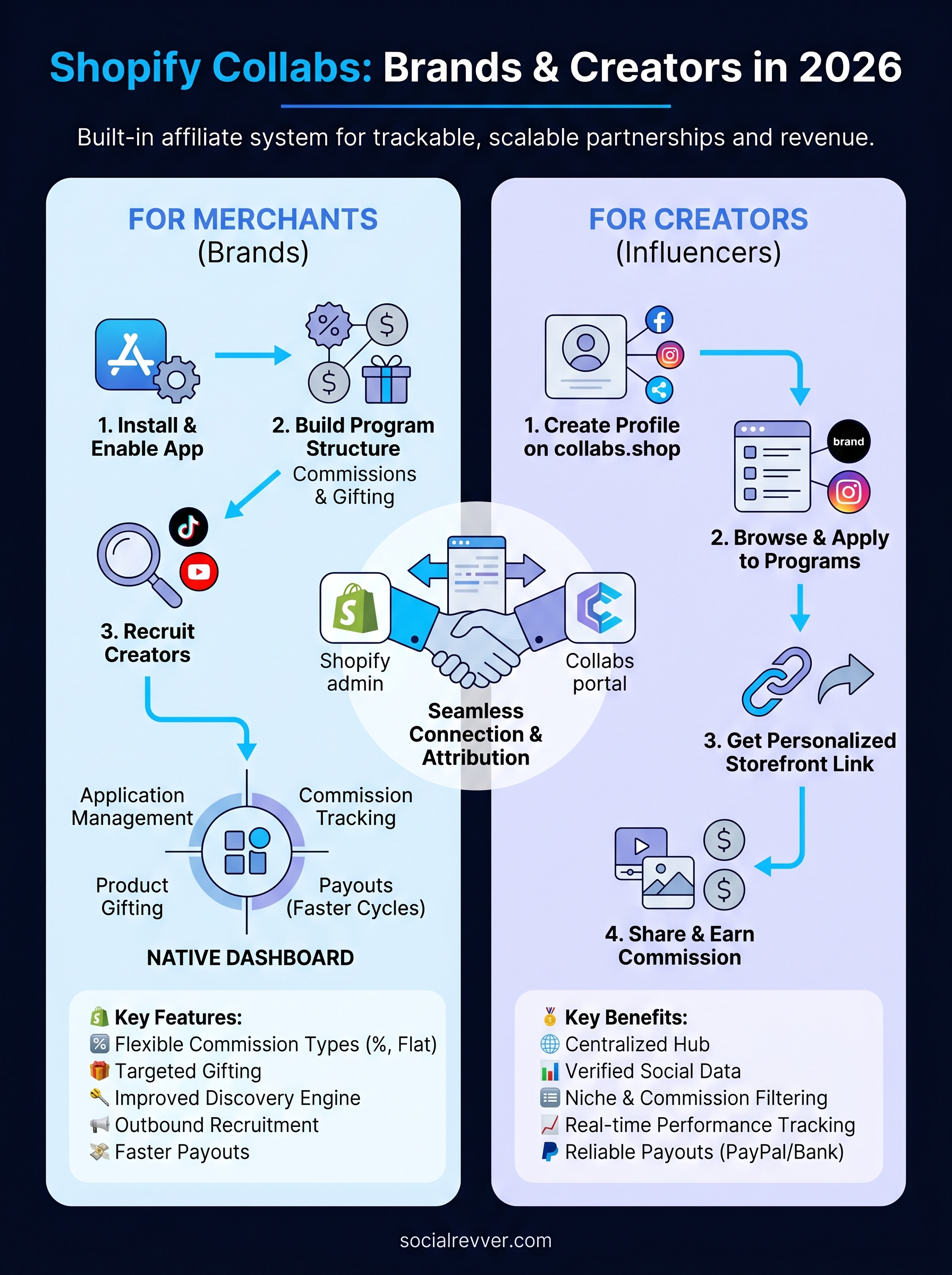
Shopify Collabs is a native affiliate and influencer marketing tool built directly into the Shopify admin. It connects merchants with creators who promote their products in exchange for commissions on sales, and it handles the entire workflow: application management, commission tracking, product gifting, and payouts. You don't need a third-party platform or a separate app. Everything runs inside the same dashboard where you already manage inventory, orders, and customers.
Shopify Collabs turns creator partnerships from a manual relationship-management task into a trackable, scalable system that attributes every sale to the creator who drove it.
How it works for merchants
On the merchant side, Shopify Collabs gives you a full program management hub inside your existing Shopify account. You build your affiliate program by setting commission structures (flat dollar amount or percentage of sale), creating a branded public application page that creators can discover and apply through, and deciding which products qualify for gifting. When a creator generates a sale, Shopify attributes it automatically using that creator's unique tracking link, so your revenue data stays accurate and individual creator performance is measurable from day one.
Here's what merchants can configure inside Collabs:
- Commission type: percentage of sale or flat dollar amount per conversion
- Product eligibility: apply commissions store-wide or limit to specific collections
- Gift rules: allow creators to request free products before they start promoting
- Approval workflow: manually review and approve each creator application before granting access
- Payout schedule: set payment timing after orders are fulfilled and past your return window
How it works for creators
Creators sign up through collabs.shop, the public-facing portal that sits separately from the Shopify merchant admin. Once you build a profile, you can browse active programs across thousands of brands, apply directly from the platform, and wait for approval. Your profile pulls in social platform data including follower counts, engagement rates, and audience demographics, and that information is what merchants see when they evaluate your application, so an incomplete profile costs you approvals.
After a brand approves you, you receive a personalized storefront link to share with your audience. Every purchase made through that link is tracked back to your account automatically. Payouts process through PayPal or bank transfer, and the merchant controls the release timing based on their return window and fulfillment status, which means your commission clears once the order is confirmed and past the refund period.
What has changed in 2026
Shopify has made the platform considerably more functional since its original launch. The most significant update is the improved creator discovery engine: merchants can now search the Collabs network using filters like platform (TikTok, Instagram, YouTube), niche category, follower range, and engagement benchmarks. Previously, brands waited for creators to find them through the application page. Now, active outbound recruitment inside the network is a legitimate and effective strategy for filling your program with the right people quickly.
Payout speed has also improved. Shopify now supports faster disbursement cycles for qualifying accounts, bringing processing time from 30-plus days down to roughly seven days in many cases. For creators treating affiliate income as a serious revenue channel, that change alone makes Shopify Collabs more competitive against older standalone affiliate platforms that still run on monthly pay cycles.
Step 1. Set up Shopify Collabs for your store
Getting started with Shopify Collabs takes under 30 minutes if you know what to configure from the beginning. The install is straightforward, but the decisions you make during setup, particularly around your public application page, directly affect how many quality creators find and apply to your program. Treat this step as laying the foundation for every creator relationship that follows.
Install and enable the app
Shopify Collabs is free for merchants on any paid Shopify plan. To install it, log into your Shopify admin, navigate to the Shopify App Store, and search for "Shopify Collabs." Click Install, and the app adds a dedicated Collabs section directly into your left-hand admin navigation. No third-party accounts required, no API keys to configure, and no separate billing to set up.
Once the app is installed, Shopify prompts you to complete your brand profile. Fill this out in full before you do anything else. Creators browse brand profiles when deciding where to apply, so a profile with missing details, no brand description, or no product images will get skipped. Complete every field.
Your brand profile is the first thing a creator sees, and a thin profile signals that your program is not worth their time.
Here is the minimum information you need to complete before your program goes live:
- Brand name and logo (used on your public application page)
- Short brand description (two to three sentences explaining what you sell and who it is for)
- Website URL linked back to your Shopify store
- Social media handles so creators can evaluate your existing presence
- Product catalog connected so creators can browse what they will be promoting
Configure your public-facing application page
Your application page is the URL you share publicly so creators can discover and apply to your program. Shopify generates this automatically at a branded URL once your profile is complete. The key configuration decision here is whether to run an open or closed application: open allows any creator to apply without approval, while closed requires you to manually review each applicant before they receive a tracking link.
For most brands, closed applications are the right call. They give you control over who represents your products and keep your commission budget focused on creators whose audiences actually match your customer profile.
Step 2. Build programs, commissions, and gifts
Once your store profile is complete, the next step is building the actual program structure inside Shopify Collabs. This is where you define the terms creators agree to when they join: what they earn, which products they can promote, and whether they receive free product before they start driving traffic. Getting these details right directly affects the quality of creators who say yes and how much effort they put in once they're active.
Set your commission structure
Your commission setup is the single most important factor in whether experienced creators choose your program over a competitor's. Percentage-based commissions are the standard choice for most merchants because they scale naturally with order value, but flat-dollar commissions can work well if your product catalog has a consistent price point and a high enough margin to make the fixed amount attractive.
A commission rate that feels too low will get your program ignored. Research what competing brands in your category offer before you finalize your rate.
Here is a practical reference for setting competitive rates by category:
| Product Category | Common Commission Range |
|---|---|
| Apparel and accessories | 10% to 20% |
| Beauty and skincare | 15% to 25% |
| Health and wellness | 10% to 20% |
| Home goods | 8% to 15% |
| Digital products or courses | 20% to 40% |
Inside the Collabs dashboard, navigate to Programs, click Create Program, and enter your commission type, rate, and the product collections it applies to. You can create multiple programs if you want to offer different rates for different product lines or creator tiers.
Configure product gifting
Product gifting lets creators request free items from your catalog before they start promoting, which is one of the most effective ways to generate authentic content. A creator who has actually used your product will produce better content than one writing from a product page description.
To enable gifting, open your program settings and toggle on the Gifting option. Set a maximum order value per request, choose which collections are eligible, and decide whether gifts require your manual approval or process automatically. Keep your gifting limit realistic, something in the range of one to two products per creator, so the program stays sustainable as your creator roster grows.
Step 3. Recruit creators and run the workflow
With your program structure in place, the next job is filling it with the right creators. Shopify Collabs gives you two ways to do this: wait for inbound applications through your public page, or go outbound and recruit directly from the creator network. Most brands that generate consistent creator-driven revenue do both, but active outbound recruitment is what separates programs that scale from ones that stagnate.
Find creators inside the Collabs network
Inside your Collabs dashboard, open the Discover Creators section. From here, you can filter the network by platform (TikTok, Instagram, YouTube), niche category, follower range, and engagement rate. Use narrow filters rather than broad ones. A creator with 50,000 engaged followers in your exact product niche will outperform a creator with 500,000 general-interest followers almost every time.

Prioritize engagement rate over follower count when evaluating whether a creator is worth recruiting.
When you find a strong match, send a collaboration invite directly through the platform. Run each candidate against this list before you reach out:
- Audience demographics align with your customer profile
- Recent content is consistent and relevant to your product category
- Engagement rate sits above 2% on their primary platform
- Any visible previous brand deals are in adjacent, not competing, categories
Send outreach that gets a response
Your invite message is the first impression you make on a creator, and a generic message gets ignored. Use a short, specific note that names what you sell, states the commission rate clearly, and mentions whether you offer free product upfront. Here is a direct template you can adapt:
Hi [Creator Name],
Found your [platform] profile through the Collabs network. We sell [brief product description] and our program pays [X]% commission on every sale you drive, plus a free gift to get started.
Your audience looks like a strong match. Apply here if you're interested: [application URL]
[Your name]
Review applications and keep the workflow moving
Once applications come in, approve or decline within 48 hours. Slow response times signal to creators that your program is not actively managed, and strong candidates will move on fast. Set a recurring calendar block to check your Collabs inbox twice per week so approvals stay current and your active roster keeps building consistently.
Step 4. Join Collabs as a creator and earn
Shopify Collabs opens a direct path to affiliate income that does not require you to cold-pitch brands individually or manage your own tracking setup. The entire system runs through one free account, and once you are approved by a merchant, your personalized link handles attribution automatically so you can focus on creating content rather than chasing commission records.
Create your creator profile on collabs.shop
Your starting point is collabs.shop, the public creator portal where you build your profile and browse available brand programs. Sign up using your email address, connect your social accounts, and complete every section of your profile before you apply anywhere. Merchants filter the creator network by platform, niche, follower count, and engagement rate, so a half-finished profile puts you at the bottom of every search result.
A complete, well-written profile is the difference between getting approved quickly and sitting in a pending queue for weeks.
Here is what your profile needs before you start applying:
- Primary platform connected with verified follower and engagement data
- Niche category selected that matches the content you actually post
- Short bio (two to three sentences) describing your audience and content focus
- Profile photo that matches your public brand across platforms
- PayPal or bank account linked so payouts process without delays
Apply to brand programs that fit your audience
Browse the active brand programs inside the Collabs portal and filter by product category and commission rate to find programs worth your time. Do not apply to every program available. Select brands whose products your audience would genuinely buy, because your conversion rate determines how much you earn, and a poor product fit produces clicks that never convert.
When you apply, some brands include a short intake form asking about your content style or audience demographics. Answer these clearly and specifically. Merchants reviewing dozens of applications will approve the creator who shows clear alignment over the one who submits a generic response.
Track performance and maximize your earnings
Once a brand approves you, you receive a unique storefront link inside your Collabs dashboard. Share that link in video descriptions, bio links, and any platform where your audience takes action. Your dashboard shows clicks, conversions, and pending commission amounts in real time so you can see which content formats are driving actual sales and double down on what works.
Wrap-up and next steps
Shopify Collabs gives both merchants and creators a functional, trackable system to turn social audiences into real revenue. Merchants get a full program management hub with commissions, gifting, and creator discovery built in. Creators get a single dashboard that handles applications, tracking links, and payouts without the friction of managing multiple brand relationships manually.
The steps are straightforward: set up your store profile, build a commission structure that attracts serious creators, recruit actively from the network, and keep your approval workflow moving. If you are a creator, a complete profile and selective applications will get you further than mass-applying to every program available.
The platform handles the mechanics, but the content driving traffic to those links still needs to be built with intention. If you want a system that engineers consistent short-form content into predictable revenue, get a free social media strategy from our team and see what a data-driven content infrastructure looks like in practice.