
YouTube Shorts rack up over 70 billion daily views. That's not a typo. If you're searching for how to make YouTube Shorts that actually get noticed, you're asking the right question, because most creators are leaving massive reach on the table with content that disappears into the void.
At SocialRevver, we've analyzed over 750,000 short-form videos to identify what separates forgettable clips from content that builds real authority. The technical process of creating Shorts is straightforward. Making them perform? That requires understanding the system behind the algorithm.
This guide covers everything: the step-by-step process for creating Shorts on mobile and desktop, the best editing tools available, and the strategic elements that give your content a real shot at going viral. Whether you're a founder building investor credibility or a creator scaling your brand, you'll walk away with a clear framework to produce Shorts that actually move the needle.
What you need before you start
You don't need a professional studio to learn how to make YouTube Shorts that perform. The barrier to entry is intentionally low by design, but having the right pieces in place before you hit record saves hours of backtracking. Most creators skip this step and wonder why their editing process drags or their content looks inconsistent compared to high-performing accounts.
Basic technical requirements
Your smartphone is already enough to get started. You need a mobile device with a decent camera (iPhone 8 or newer, Android equivalent from 2018+) or access to a desktop computer with YouTube Studio. The YouTube app itself includes a built-in Shorts camera with basic editing tools, so you're not required to download third-party software immediately.
Here's what you need at minimum:
- A YouTube account in good standing
- Mobile: YouTube app (iOS or Android, updated to latest version)
- Desktop: Any browser with access to YouTube Studio
- Video files under 60 seconds in vertical format (9:16 aspect ratio)
- Adequate lighting (natural light works, ring lights help)
The technical setup matters far less than understanding what makes viewers watch until the end.
Content preparation that matters
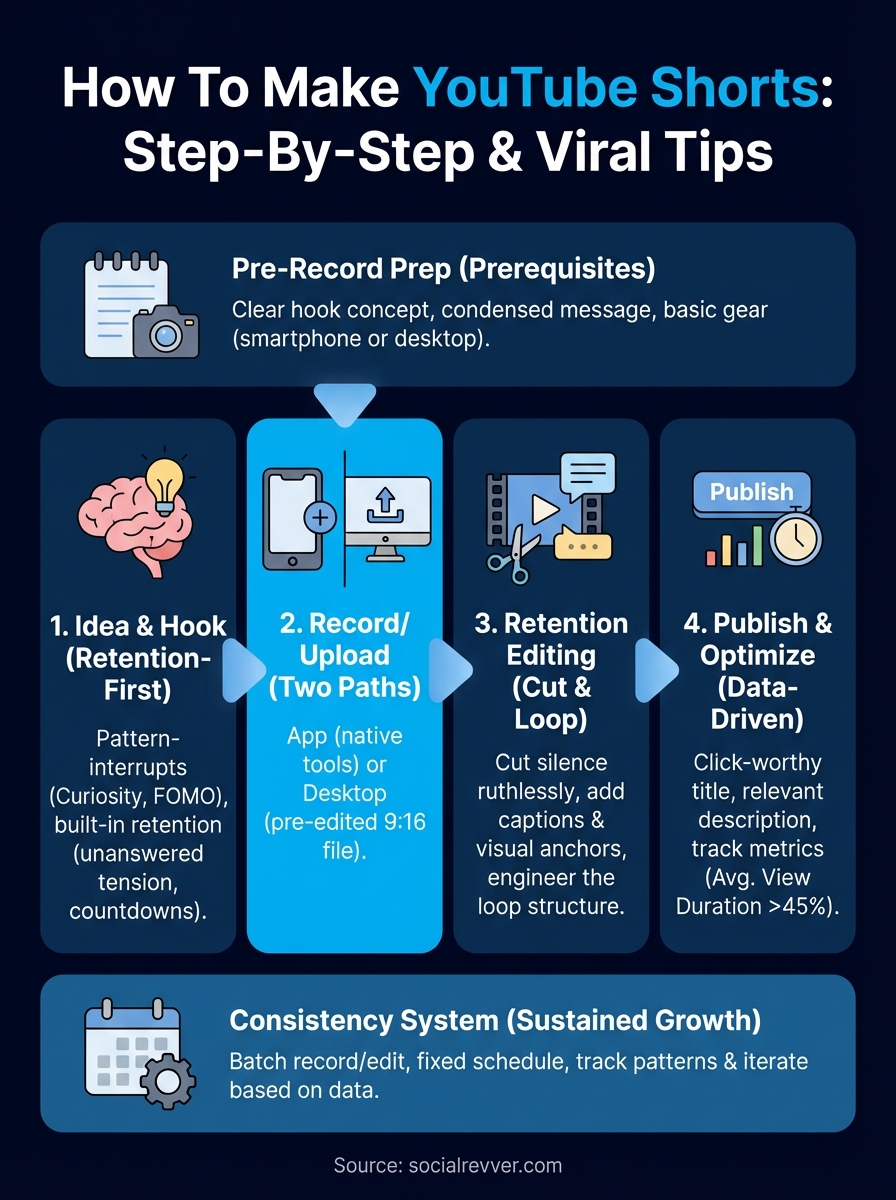
Before you record anything, you need a clear hook concept and a retention structure. This means knowing your first three seconds cold, because that window determines whether someone scrolls or stays. You also need your core message condensed into a single sentence, not a rambling explanation. Write it down. If you can't explain your Short's value in ten words, you're not ready to record. The best-performing Shorts we've studied all share this trait: they know exactly what they're delivering before the camera rolls.
Step 1. Pick a Shorts idea that keeps attention
Your idea determines everything that follows, yet most creators treat this step like a coin flip. The difference between a Short that dies at 100 views and one that hits 100,000 starts here, with the concept you choose before you even think about hitting record. Learning how to make YouTube Shorts begins with understanding that not all ideas are equal. Some concepts have retention baked into their structure, while others fight the algorithm from frame one.
Pattern-interrupt hooks that stop scrolling
You need a hook concept that creates immediate cognitive dissonance in the viewer's mind. This means starting with something unexpected, contradictory, or emotionally charged that forces the brain to pause. Examples that work consistently:
- "Everyone does [common thing] wrong..."
- "The one thing nobody tells you about..."
- "[Bold claim] and here's proof..."
- "I lost $10K learning this..."
These aren't templates to copy verbatim. They're psychological patterns that trigger curiosity or fear of missing out, which are the two strongest retention drivers in short-form content.
The first three seconds either earn attention or lose it. There's no middle ground.
Content angles with built-in retention
Choose topics that naturally create unanswered tension throughout the video. Transformation content (before/after), countdown formats (top 3 mistakes), and myth-busting concepts all force viewers to watch until the payoff. Avoid ideas that answer the question in the first five seconds.
Step 2. Record in the app or upload from desktop
You have two distinct paths for creating Shorts, and your choice depends on whether you're working with raw footage or polished clips. The YouTube mobile app offers a native recording tool with basic editing features built in, while desktop uploads give you full control over pre-edited content. Both methods work, but understanding when to use each saves time and matches your workflow to your content type.
Recording directly in the YouTube app
Open the YouTube app and tap the plus icon at the bottom center of your screen, then select "Create a Short." This launches the built-in Shorts camera where you can record up to 60 seconds of vertical video. You'll see recording controls similar to Instagram Stories: a red button to start and stop, speed adjustments (0.3x to 3x), and a timer for hands-free recording.

The app's native tools include:
- Multi-clip recording (pause and resume without stitching)
- Built-in music library from YouTube's licensed tracks
- Text overlays and basic filters
- 15-second or 60-second duration options
Tap the checkmark when finished to move into the editing interface within the app itself.
Uploading pre-recorded content from desktop
Navigate to YouTube Studio on your desktop browser, click "Create" in the top right, then select "Upload videos." Drag your vertical video file (9:16 aspect ratio) into the upload area. YouTube automatically detects vertical format and tags it as a Short if it's under 60 seconds. You'll add your title, description, and thumbnail during the standard upload flow before publishing.
Desktop uploads let you leverage professional editing software before the video ever touches YouTube's system.
Step 3. Edit for retention, clarity, and loop
Editing separates watchable content from content that performs. When you learn how to make YouTube Shorts that hold attention, you're really learning to edit for seconds-level precision, not just aesthetic polish. Your goal isn't to make something pretty. Your goal is to eliminate every frame that gives viewers permission to scroll away. This means cutting dead air, reinforcing your message visually, and creating an ending that loops back into the beginning.
Cut ruthlessly for watch time
Remove every second of silence between sentences. Delete filler words, long pauses, and any moment where nothing is happening on screen. Your pacing should feel slightly uncomfortable if you're used to traditional video. Export your first cut, watch it back, and identify the exact timestamp where your attention drifts. That's where most viewers leave. Cut harder at that point.
Retention drops the moment your content stops moving forward, so every edit decision should answer: does this second add value or kill momentum?
Add captions and visual anchors
Burn hardcoded captions into your video using CapCut, Premiere, or YouTube's editor. Viewers scroll with sound off, so text isn't optional. Use kinetic typography (words that scale or animate on key phrases) to reinforce your hook and main points. Add zoom cuts every 3-4 seconds to maintain visual rhythm, and overlay b-roll or graphics when explaining abstract concepts.
Engineer the loop structure
End your Short with a callback to your opening line or pose a new question that forces viewers to rewatch. Example: if your hook was "the biggest mistake," your outro should reference what happens if they ignore it. Structural loops increase average view duration beyond 100%, which signals the algorithm to push your content harder.
Step 4. Publish, optimize, and improve fast
Publishing your Short is not the finish line. It's the data collection point where you learn what actually works versus what you assumed would work. The upload process takes less than two minutes, but the optimization decisions you make during publishing directly impact whether the algorithm promotes your content or buries it. Speed matters here because YouTube's recommendation system makes initial distribution decisions within the first hour of upload.
Write titles and descriptions that click
Your title needs to include your target keyword while creating curiosity, not just describing the video. Use the description field to add relevant context that helps YouTube's algorithm understand your content. Include "how to make YouTube Shorts" or related phrases naturally if they fit your topic. Add 3-5 hashtags maximum, and avoid clickbait that your thumbnail can't deliver.
Track performance and iterate within 48 hours
Check YouTube Studio Analytics within 24 hours to identify what's working. Focus on these core retention signals:
- Average view duration (target: above 45%)
- Traffic source (YouTube Shorts feed vs. Browse)
- Watch time from new viewers
If retention drops below 40%, your hook failed. Repost improved versions of underperforming content instead of abandoning concepts completely.
The first version teaches you what to fix in the second version, so publish fast and improve faster.
A simple plan to stay consistent
Publishing one Short teaches you more than reading ten guides about how to make YouTube Shorts. Your consistency framework needs just three non-negotiable actions each week: record three concepts on the same day, batch-edit them in one sitting, and publish on a fixed schedule (Monday/Wednesday/Friday works for most creators). This removes decision fatigue and turns content creation into a system instead of a creative sprint each time you need to post.
Track what performs in a simple spreadsheet: hook type, topic category, and retention percentage. After 12 Shorts, patterns emerge that show you exactly what your audience wants to watch. Most creators quit before they reach this data threshold, which is why they never escape the guessing game that keeps them stuck at inconsistent results.
If you want a professional system built for you instead of piecing it together yourself, apply to work with our team and get a free 40+ slide strategy showing exactly how to turn your Shorts into a predictable growth engine.